Voice notes that land where you work.
Tap the widget, speak your thought, and Saycast transcribes it and sends it straight to Notion, Todoist, Slack, or any webhook — before it slips your mind.
Speak→Transcribe→Route to your apps
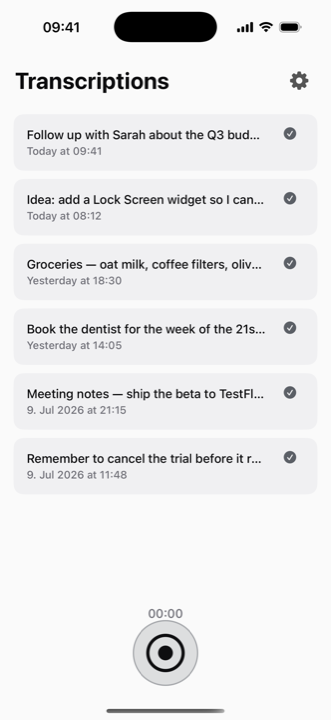
Tap the widget, speak your thought, and Saycast transcribes it and sends it straight to Notion, Todoist, Slack, or any webhook — before it slips your mind.
Home & Lock Screen
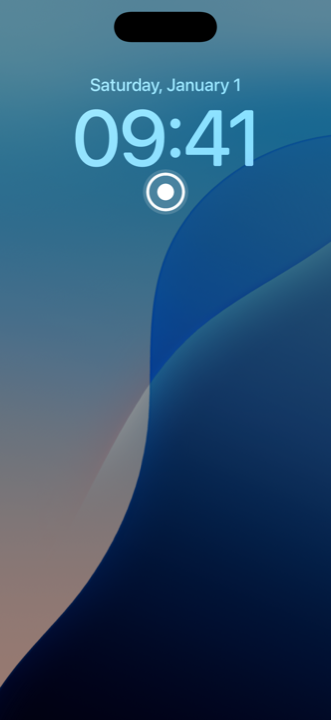
Add the Saycast widget to your Lock Screen. One tap on the record button and you're capturing — no Face ID, no hunting for the app. The thought is saved before it slips away.
How it works
No app to open, no typing. Capture from the Home or Lock Screen and let Saycast do the rest.
One tap on the widget starts recording. Speak a note, a task, a whole idea — up to any length.
Your audio is turned into clean text by the AI provider you choose — using your own API key.
The transcript is delivered to your chosen destination — Notion, Todoist, Slack, or a raw webhook.
A closer look
Integrations
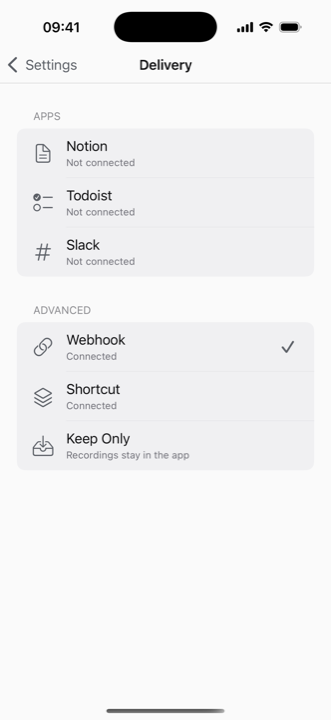
Each integration delivers straight from your phone — your recordings never touch our servers. Here's how to set up each one.
Each note becomes a new page in a database — title plus the full transcript.
Each note becomes a task — the title as the task, the full text as its description.
Each note is posted to a channel — the title bold, the transcript below.
Need something else? Saycast also supports a raw Webhook (POST the JSON anywhere), an Apple Shortcut hand-off, or Keep Only to just save notes in the app.
Bring your own key
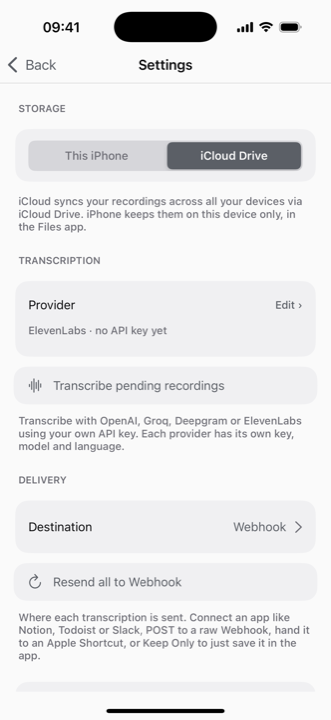
Transcribe with OpenAI, Groq, Deepgram, or ElevenLabs using your own API key — each provider with its own model and language. No middleman, no markup.
Saycast turns a ten-second voice note into a task, a doc, or a message — wherever you already work.
Download on the App Store